In short: This page is updated for version g109 (November 7, 2026). “Ready” features have been tested in the live game. “Beta” features work but are disabled by default; they must be manually enabled via the panel. Items under “Coming Soon” are in development and are not available as usable features today. The bot requires Windows 10/11, the official PC client of the game, and a properly configured game window to operate.
New in g109
- When a license is moved to a new computer, the old computer's code no longer pulls it back and the transfer right is not used up. The real license expiry date is shown on screen. If the top interface stays hidden, the bot reopens the game within 10 minutes. Fixed the Upgrade loop when hero EXP is insufficient.
New in g108
- Rally check is smarter: it checks right away when the icon appears, otherwise at most every 2 minutes; needless trips into the alliance menu are greatly reduced. Fixed picking a hidden building at the foggy edge and getting stuck in a loop. Fixed the search panel closing immediately when opening your own rally. License heartbeat added (bot side, does not affect customers).
New in g107
- The free statue building in Construction/Decoration is now built automatically (about +85K power); the new "Tap" area tile is recognized; the Alliance Duel VS chest and the Arms Race chest on 1080 screens are collected; the Season icon is fixed and the season-end panel is recognized; "Recruit" tasks are collected; the updater now also updates the default config.yaml.
New in g106
- Invader Zombie detection greatly improved: with the new gold-coin look and S2 snow included, the hit rate rose from 44% to 91%. Compatible with all seasons (S1-S7): desert and forest are no longer mistaken for dark maps; English "World" buttons and the English battle result screen are recognized. "Your account is active on another device" window: after 20 minutes the bot presses Confirm and reopens the game itself (setting baska_cihaz_geri_al_dk; 0 = off). The machine code in the license window can be copied with one click. Guiding messages when the game is not found, the mouse drifts or administrator rights are missing. Safer: it does not touch buttons in paid windows (gold bars, monthly card, scratch cards); a player card cut off at the edge is recognized and closed. Shield, recruitment (Quick Spin), story and team bar fixes for 1080p.
New in g105
- Ultrawide / wide monitor (window ratio about 1.86) fix: zombie level reading (OCR) now works correctly on these screens. Zombie "Search" fix: when the level text on the search panel cannot be read, it is read again with the area enlarged, so the bot no longer waits without pressing Search; window sizing measures the real frame and no longer pushes the window off-screen.
New in g104
- Auto rally fix: the "Your selected troops are too weak… Confirm" window is now confirmed automatically (the real cause of the bot not joining rallies); the Armed Truck is sent on its own; when a selected building hides the HUD, the rally check waits 45 s; the guard presses X only after verifying.
New in g103
- Auto rally fix: rallies were missed when gathering filled all march slots; now, while a rally is open, the bot always keeps the last free march slot for the rally; the rally check no longer stalls for minutes; it joins rallies whose level cannot be read; the blind tap on the alliance button was removed; if it cannot join, the reason is written to the log.
New in g102
- Ally help: Secret Command Center → Ally Tasks → Help now collects 5 free rewards a day (mystery chest, speed-ups, refined iron); when the Armed Truck loot is full the bot sends the truck itself (with user approval); on the HQ upgrade path the building is now found by its image, so it no longer misses when the camera shifts, and it does not retry while the prerequisite building is upgrading; the yellow truck on the map is no longer mistaken for the alliance help button, and OCR dropping a digit no longer triggers false "power dropped / attack" alerts.
New in g101
- If the team set in settings is locked (e.g. the 3rd slot purchase offer), zombie and mining switch to an open team instead of waiting 10 minutes; when all teams are busy, the search wait grows step by step from 60 s up to 15 min and resets once a team is sent; the search panel no longer sits idle after mail, gear or daily task returns; story missions respect the energy wait when there is no energy.
New in g100
- With no energy packs in the bag, zombie and Invader runs no longer open the Gain Energy window every 10 minutes; they wait for energy to refill and switch to mining; the search panel no longer opens for nothing while waiting for plunder; the hidden quest lock no longer gets stuck on the search panel.
New in g99
- The daily free energy is now collected; with no energy the story monster window closes right away and retries in 30 minutes; empty taps on Headquarters, the truck icon and the search panel are gone; radar no longer mistakes name labels for windows.
New in g98
- Radar no longer mistakes the name label above hero mission pins for an open window, so the empty taps and back-outs on every radar visit are gone; when opening a rally without enough energy the window now closes right away instead of waiting 90 seconds.
New in g97
- AI support now also works on the customer's computer; rally types whose names are not in the bot's list now appear in the rally list and can be joined; locations mistaken for Invaders that open a player base or fail to open a target info card are skipped for a while, ending repeated taps on the wrong target.
New in g96
- AI support now also works on the customer's computer; rally types whose names are not in the bot's list now appear in the rally list and can be joined; locations mistaken for Invaders that open a player base or fail to open a target info card are skipped for a while, ending repeated taps on the wrong target.
New in g95
- Comprehensive audit release: Invader Zombie badges are detected on light terrain and at night in Season 4; for zombies right next to a city, Invader is selected from the target menu. When the bot panel is in front, the bot brings the game to the foreground without pausing and restores it if minimized. An available team is used instead of a locked team or one with an offer. Rallies are faster (checks every 30 seconds, no extra screen reads); digging taps are now actually sent. Stability improvements and AI support through the website.
New in g93
- Rally checks: Rallies are now checked every 30 seconds instead of 60; the old default setting of 60 is also automatically treated as 30, helping the bot join zombie rallies before they fill up.
New in g92
- Season 4 and treasure digging: Invader Zombie badges are now recognized on the Season 4 dark map; treasure digging now actually taps the coordinate link, dig site, and chest.
New in g91
- Watchdog and connection: The watchdog no longer touches the game window’s close button; if the bot panel is in front, the game is automatically brought to the front after 10 seconds. On slower computers, chat is read less often and reading pauses during rallies. If the game interface stays hidden for 10 minutes, the game restarts. After a connection drop, an ineffective Reconnect tap no longer counts as an attempt.
New in g90
- Energy: When energy runs out, the bot stops searching for zombies in vain; it automatically claims the free daily 50 energy and continues attacking.
New in g89
- Story stages: The bot completes story battles even when the formation screen loads late.
New in g88
- English game: Story stages (Optimize/Battle) and Secret Treasure digs now work.
- Mysterious Voice: The “Mysterious Voice” window in the fog is closed automatically.
- AI: The bot no longer waits when the AI response is delayed.
- Shield checks: In-game mail is no longer left open.
New in g87
- Secret tasks finish: Secret tasks are no longer abandoned when the list scrolls and the panel briefly seems to disappear.
New in g86
- High Heat Furnace: The High Heat Furnace window is recognized in the English game, and the bot relights the furnace when it goes out.
New in g85
- Resource chest selection: The resource chest selection now opens correctly in the English game.
- Bag left open: If the bag is left half open, the bot closes it right away.
New in g84
- Releasing a selected building: A building left selected is now released more reliably, so the bot taps other objects by mistake less often.
New in g83
- Return to base with hidden UI: If the interface is hidden on the world map, the bot returns to base with the "home" icon.
- Camera recovery: If the camera stays at the edge of the base, the bot recovers the view.
New in g82
- Daily VIP points at day rollover: Daily VIP points are now collected reliably at day rollover in the English game.
- Profile window closes: A profile window left open is closed automatically.
New in g81
- English Season home page recognized: The Season home page is recognized in the English game.
- No lock in season rewards: The season rewards flow no longer waits on a screen it does not recognize; the 3-minute lock is gone.
New in g80
- English upgrade prompt recognized: The English "not a prerequisite, continue?" prompt during building upgrades is recognized, so the upgrade actually starts.
- Squad buttons left alone: Team buttons are no longer tapped while a selected building is released.
- Hero list always recognized: The hero list is recognized even when an event banner covers the screen.
New in g79
- No wait in season rewards: The 3-minute wait after the panel closes in the season rewards flow is gone.
- More reliable building deselection: The bot releases a selected building more reliably.
New in g78
- Stuck building selection fixed: The bot now clears a building that stays selected without opening other buildings' windows.
- Fewer taps on decoration boxes: Unnecessary taps on decoration boxes are permanently reduced.
New in g77
- Recovers from disconnects: The "Server disconnected" window in the English game is now recognized; the bot presses Confirm and restarts the game by itself.
- Hero list no longer gets stuck: A hero list left open is closed quickly.
New in g76
- Faster building upgrades: The roughly 25-second wait after each upgrade was removed; the test account completed 38 upgrades in 45 minutes.
- Stuck-state fix: Partly visible player cards on the map are now closed too.
New in g75
- Safety: The bot no longer taps buttons on another player's card by mistake; the AI assistant never presses March or Rally buttons.
- Stuck-state fixes: A Rally window left open is now closed; the building "Level Up" reward window and a partly visible player card are recognized.
New in g74
- Stuck-state fixes: A new building that cannot be placed is cancelled automatically; a March window that will not close is now closed; reopening the game after it closes is more reliable.
- English game: VIP daily points and the free pack are also collected in the English game.
- Other: Arms Race chests are also opened in power focus; unnecessary gift box taps were reduced.
New in g73
- English game support completed: Training, hero level-up and equipment, VIP, furnace, radar, new building construction, zombie card and the task bar now work in the English game too.
- Fixes: Radar and new building construction no longer skip their turn; parachute supply crates are collected; a stuck building placement is cancelled automatically; the panel log is in English when the interface is English.
New in g72
- Expanded English game support: Research, Season and Season Pass, Stamina, VIP free packs, hidden mission dispatch, Alliance technology donations, chat, and daily task panels are now recognized in the English version of the game.
- Bag: Items such as decorations, teleports, shields, and costumes do not open with their English names either; the rule is identical to Turkish.
- Fixes: Exiting the recruitment screen after tickets run out has been fixed; an accidentally opened construction queue window now closes automatically after 30 seconds.
New in g71
- English game support (experimental): When the game language is set to English, the bot detects it automatically. In testing accounts, resource collection, building upgrades, recruitment, equipment, mail, and Alliance tasks worked live.
- Interface language: Settings → "Interface language: Türkçe / English" in the panel.
- Fixes: If the hidden mission bubble does not open the panel, the bot no longer waits for 3 minutes; freezing on the hero introduction screen after recruitment has been resolved; protection has been added to English purchase and speed-up buttons.
New in g70
- Gift box: The bot no longer repeatedly taps a wrong spot mistaken for a gift box at the top; if the same spot proves incorrect again, the wait time increases to 1, 2, 4, or 6 hours.
New in g69
- Diamond protection: Diamond costs are no longer misread; the "Insufficient Resources" window is closed with X, preventing diamond expenditure.
- Zombie throttle: Unnecessary repetitions during zombie attacks are throttled.
- Gift box: Boxes that fail to open after two attempts are skipped, preventing the bot from getting stuck.
- Shield: Battle Report lines (including corrupted readings like "Svvs | Raporu") are correctly recognized.
New in g68
- Shield: Battle Report lines in the mail list are now read more flexibly; attack reports can be opened.
- Selected building watcher: When tapping empty space, it no longer re-selects the Hidden Command Center and gets stuck.
- Health watcher: No false warnings are issued while teams are en route or training proceeds normally.
New in g67
- Shield: Battle Reports were sometimes unreadable when opening the mail list; attack reports are no longer missed.
- Health watcher: If training, mining, or buildings yield no results for a long time, alerts are logged, sent to Telegram, and displayed with a screenshot. It does not interfere with gameplay; setting name: saglik.
- Base: After restarts, the bot no longer unnecessarily taps buildings resembling gift boxes.
New in g66
- Hidden missions: The bot no longer gets stuck and repeatedly presses the same button for undispatchable missions; it skips the mission and moves to the next one.
New in g65
- Zombies and collection: When zombie targets are too strong or Stamina runs out, teams no longer idle; the bot immediately sends them to collect resources.
- Story quests: The search panel opened by a quest is no longer accidentally closed.
- Power measurement: Old power values read from injured teams no longer permanently halt zombie attacks; power is re-measured.
New in g64
- Hidden barracks: Barracks located off-screen at the bottom are no longer skipped; the bot scrolls the base view, collects ready troops, and starts new training.
New in g63
- Barracks training (Training Base 15+): New (gas-masked) soldier bubbles in barracks are now recognized; soldiers are collected and new training starts automatically.
- Bag: If there are no items to use, the bag opens less frequently, allowing the bot to focus its time on progression.
- Diamond counter: Reading diagnostics have been improved.
New in g62
- Selection boxes: In selection boxes within the bag (e.g., Material Selection Box), the bot previously exited without marking an option and pressing Use. Now, it presses Use after making a selection, ensuring boxes are opened.
New in g61
- Selection chests: Deluxe, Decoration, and Material selection chests in the bag are now opened; they were previously skipped.
- Story quest: One team is left free for monsters in quests, preventing the quest bar from getting stuck.
- Speed-ups and research: Queues are no longer opened and closed unnecessarily; the bot spends its time on progression.
- Furnace: If the base is heating up, the furnace is not lit unnecessarily, preserving coal.
New in g60
- Freezing during zombie hunting: While hunting zombies for coal, the bot failed to lower the zombie level, cycled through opening and closing the search panel, and did not send teams to mines during this process. Now, the level button is always found; zombie and mining operations run uninterrupted.
New in g59
- Truck card freeze: The bot sometimes got stuck on truck cards on the map, accidentally entering loot queues, and looped for hours on the "Quit battle?" prompt. Now, ownerless truck cards are closed, AI assistants do not press attack or loot buttons, and if this prompt appears, the bot exits without engaging in battle.
New in g58
- Connection loss: On the "Disconnected from server · Confirm" window, the bot would wait indefinitely if the button text was misread. Now, it presses Confirm, restarts the game itself, and resumes where it left off.
New in g57
- Search panel loop: The root cause of the loop where the search panel opened and closed without performing any action has been fixed. If it still occurs, the bot rests the panel for 15 minutes and switches to other tasks.
New in g56
- Early returning team: Teams returning early from collection (stopped manually) are sent back to mines without waiting 15 minutes.
- Mine level memory: Discoverable levels are remembered; when time expires, searching starts from the next higher level rather than from the beginning.
New in g55
- Mining first: Upon startup and every 20 minutes, even if base tasks are ongoing, the bot switches to the world map and dispatches mining teams; base tasks do not delay mining.
- Mining diagnostics: If mining cannot enter the queue for more than 3 minutes, the reason is written to the diagnostic log.
- Recommended settings log: When the recommended fully automatic progression settings are applied, which modules were enabled is recorded in the log.
What's New in g54
Current Panel and Core Functions
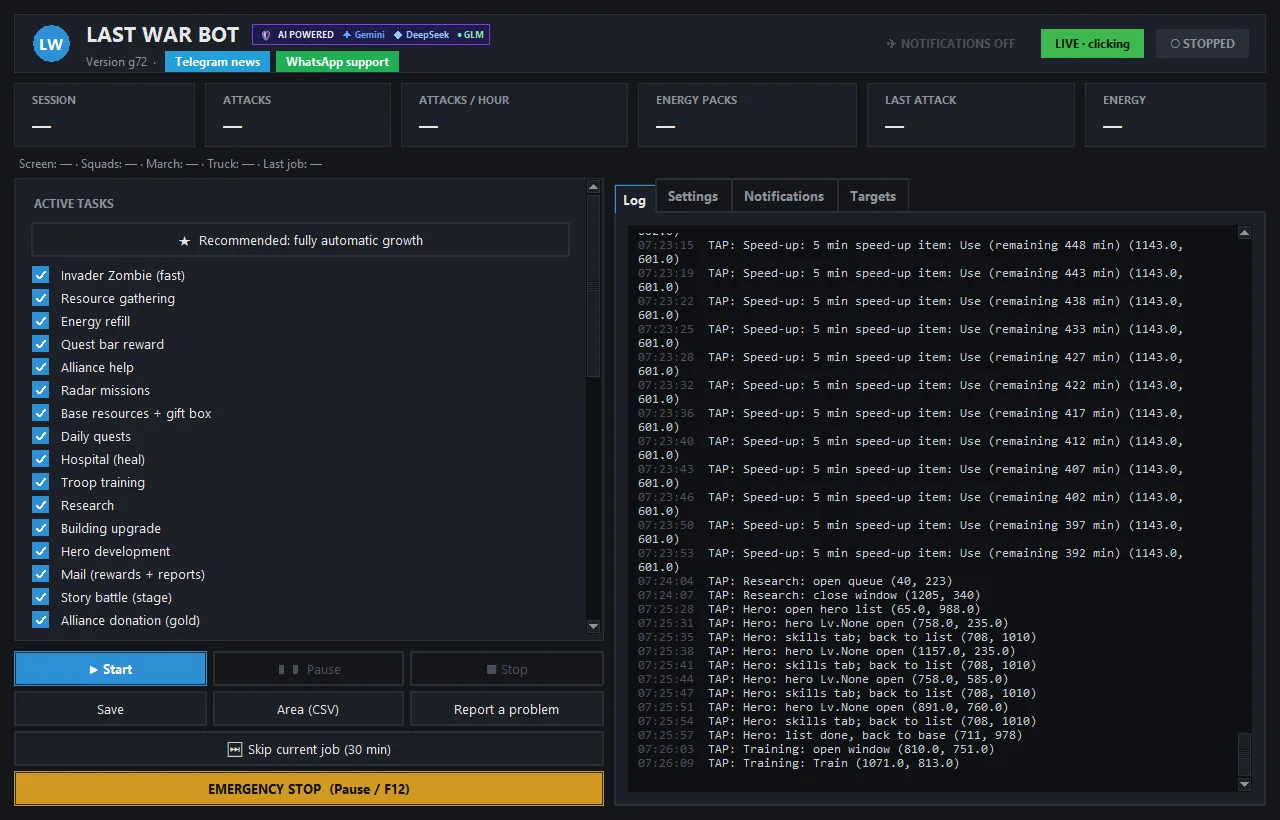
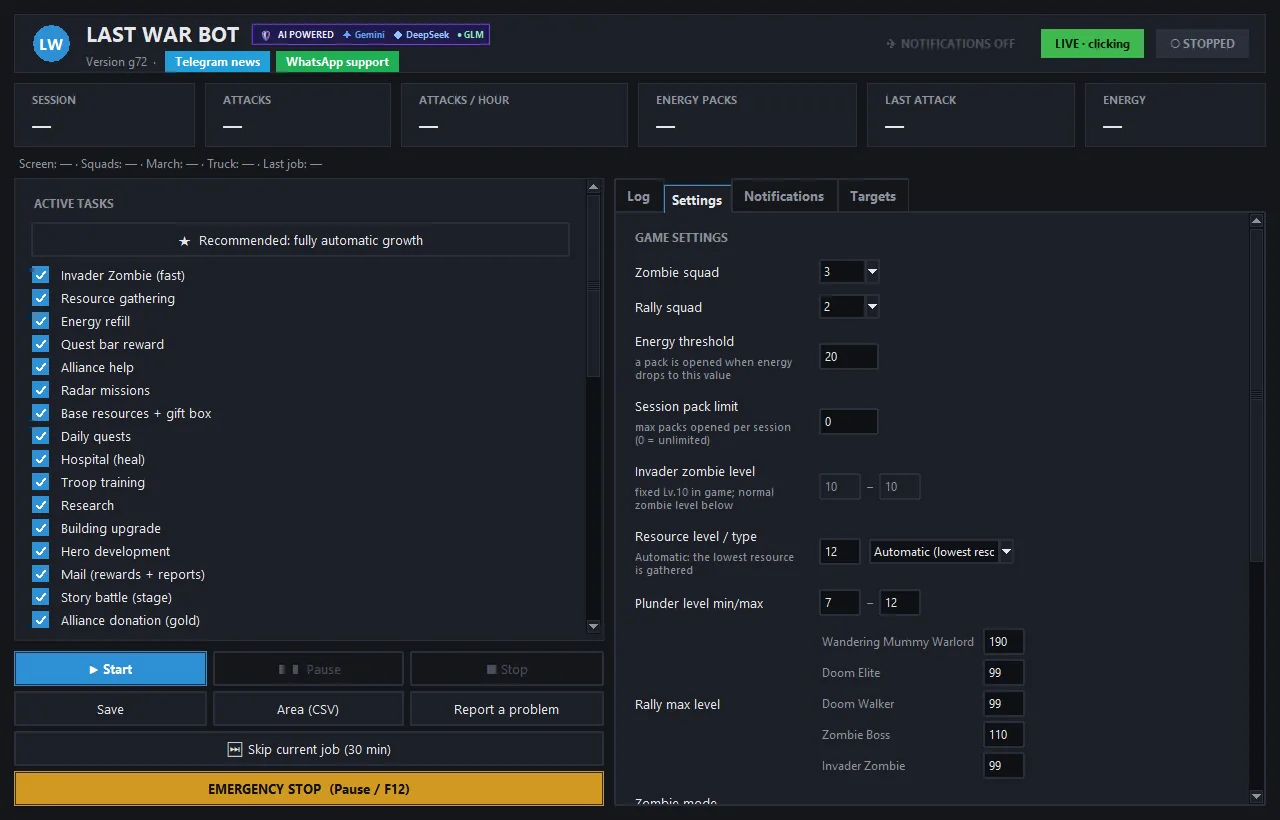
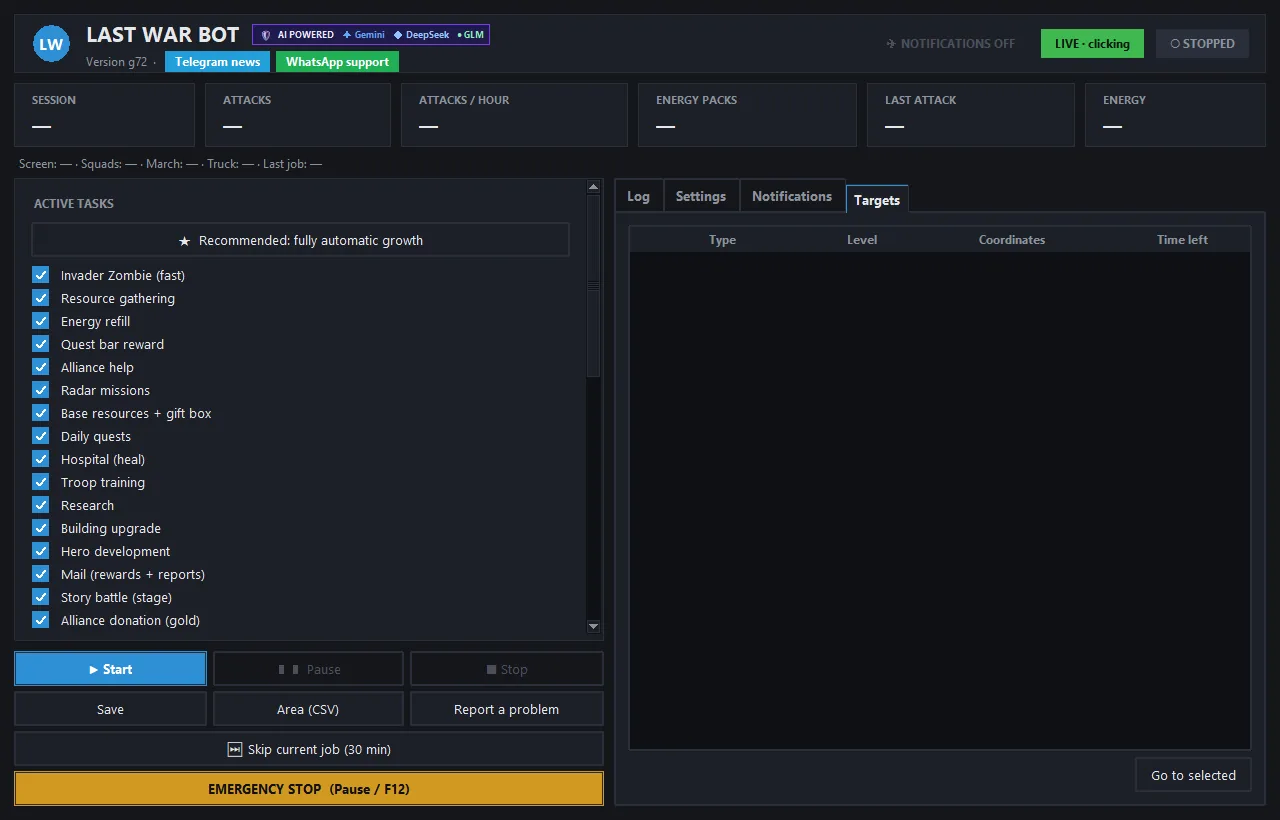
This image shows the g54 configuration screen; it is not a performance metric of an active session. You can open the Settings screen and Targets screen in full size.
| Function | User-Controlled Area | Limitation |
|---|---|---|
| Zombie, radar, and daily tasks | Task selection, team, and energy settings | Requires game window and valid targets. |
| Mine collection | Resource, team, and level | Skips teams without requests; remembers found levels. |
| Building and research | Task selection, resource, and speed-up settings | In-game prerequisites and resources apply. |
| Night shield | Night hours | Uses shields from inventory; does not purchase shields. |
| Telegram alerts | Notification link and settings | Requires Telegram setup. |
| Stuck protection | Progress tracking | Attempts recovery if no progress for 10 minutes; success is not guaranteed. |
For installation, go to the Windows download and trial page. Read about the account ban risks of game automation on the security page.
- Mine level reduction fix: When the resource name could not be read, the bot incorrectly wrote the level reduction to the wrong resource and got stuck at Lv.12; now it lowers to the found level, sends the team, and remembers this.
What's New in g53
- Stuck protection: If no progress is detected for 10 minutes, AI-assisted recovery is attempted. Success or uninterrupted operation is not guaranteed on every screen.
- Resources from inventory: When resources are insufficient, the bot uses the inventory; selects missing resources in resource choice chests and scrolls through the entire inventory.
What's New in g52
- Stuck fix: During story monster missions, when the team bar opened while teams were en route, the bot could wait for hours; now it closes the bar within 3 minutes at most and continues its work.
What's New in g51
- Barracks training: Buttons are not missed when the training window opens, and 10-hour batches are not skipped; soldier training is more consistent.
- Gold savings: Hero equipment rounds are skipped when gold is insufficient; the bot dedicates its time to mining and upgrades.
What's New in g50
- Notification windows: All notification windows like "Allies came to celebrate! / Great!" close automatically; wasted taps due to lingering windows are eliminated.
- Stuck protection: If a module repeatedly taps the same spot uselessly, it is caught and rested even if another module intervenes.
- Mine memory: Found mine levels are permanently remembered; the bot doesn't waste time with empty searches upon restart.
What's New in g49
- Mine stabilization: If the selected idle team for mining has no soldiers ("Insufficient units"), the bot doesn't repeatedly send the same team; it skips that team for 30 minutes and continues with another idle team if available.
What's New in g48
- Mine collection fix: The bot used to get stuck by repeatedly clicking the tab when the collection tab was already open; now it recognizes the open tab, selects the resource, and proceeds to Search.
- Fully automatic development: The "Recommended: fully automatic development" option also enables gradual zombie leveling; no additional settings required.
What's New in g47
- Lingering window fix: The "Speed Up" window left open at the top now closes automatically; the "search icon not found" stuck issue after rally returns is resolved.
- Mine protection: If the resource list isn't visible on the collection tab, the bot doesn't tap uselessly and retries after 15 minutes.
- Gradual zombie leveling (new): The bot starts at low levels and advances to higher levels as it wins.
What's New in g46
- Correct waiting when troops run out: The game's "Insufficient units" warning is no longer mistaken for a connection drop; the bot doesn't tap March uselessly and waits while barracks train.
- Power tracking fix: False "sudden drop" alerts caused by skipping leading digits during on-screen reading have been removed; "today's" power increase is no longer reset upon restart.
What's New in g45
- Uninterrupted research: The recommended branch screen that appears when the research queue is empty is now recognized, and the recommended node is selected. Even if filling from inventory takes long when resources are short, the research flow isn't interrupted.
- Mining in ultra development: The least abundant resource (e.g., gold) is collected automatically; the bot switches to the world map every 20 minutes.
What's New in g44
- Research acceleration: Acceleration now opens not only the construction queue but also the research queue (alternating). Research is completed using research and general accelerators from inventory; diamonds are not used for research.
What's New in g43
- Night shield: New "night hours" setting (e.g., 00:30-08:00). During these hours, if the shield is off, the bot uses shields from inventory without waiting for attacks; if no shields are in inventory, it checks again every 3 hours. No purchases are made. Default is 00:30-08:00 in ultra development mode, off in normal mode.
- Instant Telegram alerts: Sudden power drops, defense defeat reports, "left unshielded," and "shield active" statuses are instantly sent to Telegram.
What's New in g42
- Daily task fix: The text "Make any purchase once" in the task list is no longer mistaken for a purchase button; daily task rewards are fully collected. The bot still does not press actual "Buy" buttons.
What's New in g41
- Acceleration fix: Accelerator items in inventory are now actually used; the "Total Acceleration" confirmation window opened by the game is confirmed. If the window contains diamonds, purchases, or "Finish Now," the bot does not press. Constructions finish much faster in ultra development mode.
New in g40
- Ultra Development (beta, disabled by default): When enabled, the bot focuses on power growth: it starts construction on recommended buildings for idle builders, uses speedups and resource items from your inventory, trains troops, and handles research and Hero tasks. During this mode, Deer, Looting, Trucks, Rallies, Zombies, Mining, and Radar are disabled.
- Power Tracking: Generates an hourly power summary in the log; issues a warning if there is a sudden drop in power (base attack).
- Fix: Resolved an issue where trained troops were not collected from Barracks on some accounts.
New in g39
- Custom Rally Settings: In the Settings tab, you can define the time between two rally attempts (in minutes) and the maximum number of daily rallies (0 = unlimited). The default for new installations is 10 minutes; existing settings are preserved.
New in g38
- Start Own Rally Fix: Starting a rally did not begin when the Zombie or Resource Gathering module was disabled. Now, when its turn comes, the bot opens the search panel itself; the module works even when enabled alone.
New in g37
- Rally Fix: Removed the 30-second pause during rally participation.
- Daily Score Chests: Chests worth 40–200 points are opened automatically.
- Daily Tasks: Tasks showing negative counts and multiple "Claim" buttons are now correctly collected.
- Start Own Rally: The bot can start its own rally (disabled by default).
- Shield After Attack: A shield is applied after an attack; no purchases are made (disabled by default).
- Hidden Task Refresh: The Hidden Task list is refreshed using coupons; max 3 times per day, coupons only, no Diamonds spent (disabled by default).
- Hidden Task Timer: The timer is read, and the nearest completion time is logged.
- Stability: Fixed the "Congratulations" mail loop and two screen recognition errors.
New in g36
- Non-stalling Loot: The Loot card stays open for a maximum of 45 seconds; if no troops are sent, the card closes and the bot moves to another task.
- Loot Lock Fix: Resolved an issue where the loot lock was not released when the search panel opened.
- Progress Watchdog: If the bot performs only maintenance touches for 10 minutes, pending waits and locks are reset, and the bot immediately switches to base tasks (building, research, training, resources).
New in g35
- Game Window Selection: If multiple accounts or windows are open, you select which one the bot plays via Settings → "Game Window" list; the selection is persistent. In "Auto" mode, the bot locks onto the last clicked window before Start.
- Pause Only in Game Window: When "Pause on user input" is enabled, mouse and keyboard actions on other monitors do not stop the bot.
- Faster Rallies: The rally list and participation window are processed by reading only the relevant areas.
- 🎯 Rally Icon: Checks occur once per minute, the recognition area has expanded, and timers longer than 15 minutes are not counted as rallies. If the tap fails, navigation goes through the Alliance menu.
New in g34
- Rally Participation: Team selection and March happen in the same round; fixed the closing of the March window. Participation is approximately 2 seconds faster.
- Hidden Tasks: When the countdown on a row ends, the bot returns to the panel and claims the reward with "Claim".
New in g33
- Rally Participation: No time limit after the March window opens; fixed dropping out of rallies on slow computers.
- Team Selection: If team slots cannot be read, the bot marches with the selected team; team selection and March happen in the same round.
- Rally List: Taps the green plus sign on the far right.
- 🎯 Rally Icon: When the war icon next to Alliance appears, taps the icon and joins without waiting for the interval. Optional, disabled by default.
- Zombie Level Label: The Invading Zombie level label on the panel is clearer.
New in g32
- Rally Participation: The bot waits until the March window appears and corrects the hour difference.
- Start Button: Clicking Start no longer pauses the bot.
- Research Speedup: Fixed stalling while using speedups during research.
- Rally Indicator: Optional, disabled by default.
New in g31
- Collection Only Mode: The bot makes no expenditures; it only collects boxes, gifts, and rewards.
- Skip Current Task: The “⏭ Skip current task” button on the panel abandons the current task and moves to the next one.
- Instant Speedup: Speedup items in the inventory are used with a single tap; no Diamonds are spent.
- Premium Alliance Gift: The bot collects these gifts but does not purchase packages.
- Pause and Safety: The bot pauses when you touch the mouse or keyboard and resumes when idle. The computer does not go to sleep while the bot is running. If the game shows a verification puzzle, the bot stops and sends a notification.
- Optional: Radar “Quick Run” and Hidden Task “Mega Deploy” are enabled via checkboxes on the panel.
How the Bot Kills Zombies
The bot searches for Invading Zombies on the map, finds normal zombies and monsters using the game’s Search screen, and sends your selected team. Before attacking, it compares team power with the target; if power is insufficient, it does not dispatch the team.
Invading Zombie Loop
The bot scans the map for the nearest Invading Zombie and sends the selected team upon finding one. While the team is attacking, it waits for the collision duration instead of attempting to resend. It skips locked team slots; if a purchase offer exists in that slot, it leaves it untouched. If the target is not visible, it continues searching by panning the map. The user determines which team to use via the panel.
Killing Normal Zombies and Monsters
For normal zombies and monsters, it uses the game’s Search → Zombies path. It searches within the level range specified in the panel, finds a suitable target, and sends the team. This flow differs from visually scanning the map for Invading Zombies; it relies on the game’s existing search screen. Check the level range and team before starting.
Zombie Modes
The panel offers three options: Invading, Normal, and Both. Invading mode focuses on the Invading Zombie loop, while Normal mode focuses on searching for normal zombies and monsters. In Both mode, if no Invading Zombie is found, the bot kills normal zombies. The default mode for new setups is Both; mode selection is under your control.
No Fighting Without Sufficient Power
Before attacking, the bot compares team power with the game’s displayed “Recommended Power”; if power is insufficient, it does not attack. During zombie attacks, it performs a second check: it reads the “our power – target power” comparison in the march window and does not send the team if the target is stronger. The game’s recommended power is an estimate; this check does not guarantee victory in every battle.
Energy Minimum and Free Packs
You can set a minimum energy threshold. When current energy drops below this limit, the bot stops initiating new attacks. The energy refill feature uses free energy packs; it never touches packs purchased with diamonds or money. Do not assume free packs will always be available or that attacks will continue regardless; monitor energy status via the panel and in-game.
Story Battles
In story battles, the bot heals the team, sets up the optimal formation, and reads enemy power. If team power is at least 1.1 times the enemy’s, it enters the battle and collects the rewards. On our test account, stages 28–30 were won this way. Results depend on account power and stage. g30 also recognizes the moving story sword; live verification of the story quest chain is ongoing.
How the Bot Collects Resources
The bot sends idle teams to mines and fields and collects resource bubbles accumulated at the HQ. It does not add resources to the game account; it only performs the collection actions visible in the game.
Resource Collection: Mines and Fields
The resource collection flow follows the game’s Search → Gather path. The bot selects the resource type (field, iron, gold) and level, then sends an idle team; if no empty source exists at that level, it tries the next lower level. It does not consider teams busy with other tasks as idle and avoids unnecessary map changes while teams are gathering. If Auto is selected in mine settings, the bot reads resource amounts from the top bar and goes to gather the scarcest resource, ensuring balanced growth. With g30, hanging issues in mining and raids were fixed; rally teams are not sent to mines, zombies, or excavation.
HQ Resource Bubbles
It collects bread, gold, iron, EXP, and titanium alloy bubbles accumulated at the HQ. It does not click continuously: it considers conditions of at least three hours and at least six bubbles for collection; if eight hours pass, it collects anyway. It may also collect bubbles that are not yet full; on our test account, single HQ rounds increased iron from 31K to 152K and gold from 53K to 128K. These results vary based on account status and are not guaranteed.
Using Resources from Inventory
If resources are insufficient when upgrading buildings or training troops, the game opens the “Insufficient Resources” window. The bot uses resource items from your inventory in this window and continues the task, consuming one item per use. It can use resource items like 50K iron or food, and choice chests. Inventory resources are allocated by default to building upgrades along the HQ path. It never presses the “Complete All” or “Buy” buttons that complete with diamonds. It activates only immediately after upgrades or training initiated by the bot itself and has an hourly usage limit.
What rewards does the bot collect?
The bot collects available mission, radar, mail, season, VIP, and event rewards. It does not press “Go” buttons that lead to new battles or missions, nor does it touch paid packages.
Daily mission and radar rewards
It opens the daily mission panel and collects “Claim” rewards for completed missions. It also collects ready mission rewards on the radar screen. On both screens, it does not press the “Go” button that takes you to a new mission or battle; it does not complete unfinished missions, only collecting ready rewards.
Radar missions
It recognizes mission pins on the radar map and collects missions. It works on the changed radar screen in the new season as well; including gray pins in Season 2 (live-verified during the bot’s own run, 3 rewards).
Mission band reward
It collects the mission band reward when available in-game. For building missions, it goes to the relevant building only via the “Go” button on the main mission band and upgrades using resources only if sufficient. It also collects rewards for missions with targets of 8 digits or more (live-verified during the bot’s own run). You can select which missions will run automatically in the Turkish panel.
Building gift boxes
It collects the gift box that appears when a building upgrade is completed and closes the opened window. It also recognizes and opens gift boxes visible under fog or bubbles.
Mail, season rewards, and bag chests
It collects mail rewards using the “Claim All” button. It collects season rewards (tickets and chests) and opens chests in the bag. With g29, it uses all usable items in the bag. These actions are limited to rewards currently claimable on the game screen; no paid transactions are initiated.
Arms Race chests
It opens the Arms Race screen from the Events menu. If there is a reward notification, it collects the progress chest and threshold chests your points allow. It never presses “Go” buttons on rows or package purchase buttons.
Daily VIP points and free VIP package
It collects the daily free VIP points on the VIP screen and, with g29, the daily free VIP package. It does not touch enabling VIP or paid options like Monthly Cards. With g30, a separate diamond reserve can be set for VIP (optional); if the profile tap is missed, the bot retries after 10 minutes.
Hidden missions
On the hidden mission screen, it adds suitable heroes and starts the mission with Send. It can also enter the screen via the Hidden Command Center bubble at the top. It collects the reward for completed hidden missions with Claim and performs 1 dig for map pieces in Hidden Treasure. These flows have been live-verified in-game during the bot’s own run.
Dig participation
It can join digs by following treasure information shared in chat. This feature is disabled by default because it burdens the computer; you must intentionally enable it in the panel if you want to use it. A lighter version of dig participation is coming soon. You do not need to enable digging to use other tasks.
What does the bot do in the Alliance?
The bot manages alliance help, alliance gifts, and gold technology donations. It does not take over alliance management or member decisions; it does not touch diamond-based transactions.
Alliance help and gifts
In alliance help, it uses quick help and the Help Everyone button. On the Alliance Gifts screen, it collects accumulated gifts with Claim All; 33 gifts were collected in a single round on our test account. All these are free actions and verified live in-game.
Alliance technology donation
The bot donates to the recommended (thumb-marked) technology on the alliance technology screen using gold only. It never presses the diamond donation button; it does not touch the gray button during cooldown. You can adjust the maximum number of donations per visit in the panel. If your gold is below 500k, it skips only the donation; thus gold remains for buildings and research.
How does the bot upgrade the base?
The bot handles building, research, hero development, hospital healing, and troop training using only in-game resources with default settings. Diamonds are used solely for VIP/building speed-up checkboxes explicitly marked as g29 diamonds on the panel; it never presses “Finish Now” or purchase buttons.
Heating furnace
If the bot detects that the furnace is off on the temperature panel (g30), it turns the furnace on to prevent the base from freezing. The panel allows selecting auto-on during snowstorms and provides warnings when coal runs low. Verified in live gameplay.
One-click fully automatic progression
The panel features a “Recommended: Fully Automatic Progression” button. A single click enables building upgrades, research, hero development, chest/reward collection, mission rewards, and resource gathering simultaneously; you do not need to select each task individually. This setting does not spend diamonds and avoids purchases or paid instant completions. You can later adjust individual task checkboxes if desired. On our test account, total power rose from approximately 735k on October 9 to about 1.4M on October 14—nearly doubling in five days. Results are not guaranteed.
Building upgrades and HQ requirements
The bot performs recommended building upgrades using only in-game resources. If an upgrade requires another building’s level first (HQ requirement chain), the bot reads this requirement from the screen and upgrades the prerequisite building first. Building upgrades and research proceed without idle waiting: once one finishes, the bot starts the next suitable task. On our test account, 8 upgrades were completed in 6 minutes; the HQ requirement chain was tested live at HQ Level 11. When resources are insufficient, it stops futile attempts and waits for accumulation. After construction completes, it returns to the base immediately without waiting for the next base cycle.
New building construction
If new buildings are available in the Hammer (construction) menu, the bot selects them from the Economy, Season, and Military tabs, places them, and confirms with the green checkmark. It skips cards lacking sufficient resources and never touches “Go” or purchase buttons. On our test account, 9 new buildings were constructed this way.
Research
The bot collects finished research, initiates appropriate research across all categories using resources, and closes the window. It does not use diamond-based completion. If research requires a specific building level (e.g., Tech Center Lv.12), the bot reads this requirement from the screen and assigns the freed builder to that building first, preventing research queues from stalling due to building prerequisites.
Hero development
The bot levels up heroes using EXP, advances their rank using fragments, and unlocks new heroes once fragments are complete. For equipment, it uses the “Equip All” function. This feature operates within existing in-game options and resources.
Hero recruitment
The bot uses free recruitment chances and recruitment tickets in the inventory. It does not spend diamonds; if no tickets are available, it skips recruitment.
Hero equipment upgrades
When Upgrade Hero Equipment is enabled on the panel, the bot upgrades hero equipment using only gold and ore. It stops if gold drops below 1 million; it never presses Swap or Unequip buttons. Disabled by default; enabled by the “Recommended” setting. Verified live during the bot’s own cycle.
Hospital and troop training
When wounded troops accumulate in the hospital, the bot heals them using resources and collects healed troops. It collects finished trained troops and starts new training in the barracks. It never touches “Finish Now” or diamond-based speed-up buttons; healing and training complete within normal game durations.
Base cycle
If at least one base task is enabled, the bot periodically (default: 30 minutes) travels from the world map to the base, performs enabled tasks, and returns to the world. This ensures base operations run uninterrupted alongside zombie combat and resource gathering cycles.
Which features are beta and disabled by default?
Beta features work but are disabled by default; you must explicitly enable them on the panel to use them. The sole exception is auto-bringing the game to the foreground, which has no setting. Monitor results on-screen during first use.
Construction and research speed-ups (using inventory items)
This option uses applicable speed-up items from the inventory. With g44, research queue support was added: the bot alternately checks construction and research queues, using research-specific and general speed-ups from inventory for research; it does not spend diamonds. Usage depends on panel settings and available items. Diamond-based VIP/building speed-up checkboxes are separate optional settings; do not confuse them with inventory-item-based speed-ups.
Rally participation and filters
The rally participation feature joins existing rallies from the Alliance War screen. With g31, if a configured team is en route, it joins with an idle team and executes March in one step via team selection. Alliance membership is required. Filters select or skip rallies based on type-specific max level, fullness, maximum distance (km), minimum remaining time, and rally team. Default max levels: Wandering Mummy Warlord 190, Zombie Boss 110, Apocalypse Elite, Apocalypse Wanderer, and Invading Zombie 99; unlisted types default to 99. Rally card reading verified live; live verification of join tap actions is ongoing. Starting your own rally is a separate option added in g37 and is disabled by default.
Firework chests
When Firework Chests is enabled on the panel, the bot collects firework event chests. Disabled by default; enabled by the “Recommended” setting. Chest collection confirmed in controlled live tests; not yet observed during the bot’s own cycle.
Auto-bring game to foreground
If the game window remains in the background for over 1 minute and keyboard/mouse have been inactive for 2 minutes, the bot brings the game to the foreground; it does not interfere while you are using the computer. No setting exists; always active. Passed unit tests; not yet triggered in live gameplay.
Loot finder
Finds loot opportunities and notifies you; does not attack.
Season compatibility
Each server may be in a different season. The bot reads the season badge and adapts to changing interfaces and varied terrains such as snow, dark, desert, or forest. Fully tested in Season 2; other seasons are supported but remain in beta status.
How do I control the bot?
The bot is managed via a Turkish panel; it supports remote status checks and commands via Telegram, and includes an EMERGENCY STOP shortcut on your computer. Stuck-watchers automatically recover the bot from unrecognized screens.
Turkish Panel
Task checkboxes and settings for teams, energy, level ranges, and zombie mode are in Turkish within the panel. Buttons in the program title bar provide one-click access to the Telegram announcement channel and WhatsApp support line. Support is also provided in Turkish: contact us via WhatsApp at 0538 054 55 53. Follow the Setup page for installation steps.
Remote Control via Telegram
You can check the bot's status and manage specific operations remotely using Telegram commands. Ready-made commands include: /durum (status), /ekran (screenshot), /duraklat (pause), /devam (resume), /ac <task> (enable task), and /kapat <task> (disable task). Remote control helps manage selected tasks of the bot running on your PC; it is not a separate game bot for mobile devices. The game client must remain open on the Windows PC.
EMERGENCY STOP Shortcut and Trial Mode
The Pause/Break key (or F12) serves as the EMERGENCY STOP shortcut; it immediately halts operation if you observe unexpected behavior. In trial mode, the bot monitors the screen but does not click; use this after setup to see how the screen is interpreted.
Stuck-Watcher and Re-login
If the bot remains on an unrecognized screen for 90 seconds, it recovers itself; any lingering panels or toolbars are closed within 3 minutes. Repeat protection rests a task that attempts the same touch 10 times consecutively for 5 minutes. Even if stuck in an unknown window, the bot self-recovers within 10 minutes at most. Upon connection loss, server maintenance, or game closure, it automatically re-logs into the game and resumes its tasks. Only one instance of the program runs simultaneously. During a 90-minute live session on October 9th, 0 errors were observed across 364 touches; this single-session result is not a guarantee.
Pop-up Windows and Return to World Map
The bot closes intervening screens such as level-up celebrations, HQ level cards, and promotional windows, then continues its work; it does not touch purchase buttons in these windows. It closes accidentally opened base cards. If idle at the base, it automatically switches to the World Map; while on the map, it does not press ESC, which could open the exit-game window. When another window comes to the foreground, window protection stops clicking.
Timer, Notifications, and Counters
Use the timer to schedule the bot to run at specific hours. Hourly summary notifications and session counters provide regular information about operation; verify in-game actions on-screen when necessary.
Area Scan (CSV)
Using the button in the panel, while the bot is paused, it scans the world map around your base in a grid pattern. It reads player names, alliance tags, and levels visible on the screen; merges duplicates and writes a CSV file openable in Excel. It does not touch cities or bases, nor does it read game memory. Shield status reading is coming soon.
"Report Issue" in the Panel
The Report Issue button in the panel collects logs and recent screenshots into a single zip file. Sending this file to the WhatsApp support line allows faster issue investigation. The zip file contains no passwords, license keys, or Telegram keys.
Automatic Update
The bot checks for new versions upon each launch. Update files are not installed unless signed with our key; downloaded packages are additionally verified via SHA-256 digest. Your settings, license, and logs are preserved, and the bot restarts itself after updating. New versions and update notes are shared in our Telegram announcement channel.
How does the license work?
The license is activated on a single computer using a short code obtained via WhatsApp. A free 7-day trial is available; monthly licenses cost 199 TL, and lifetime licenses cost 1,999 TL.
Activation via Short Code
You receive a short license code starting with LWB via WhatsApp, paste it into the license field in the program, and press Activate; an internet connection is required for this step. The code binds to the first computer where it is activated, and the duration starts at that moment. You do not need to enter a new code when your time is extended: when less than 7 days remain until expiration, the bot automatically fetches the new end date once connected to the internet. If you change computers, you can request moving the code to the new computer via the WhatsApp support line. Previously issued long license keys continue to work.
Trial and Pricing
A free 7-day trial license is available initially. Monthly licenses cost 199 TL, and lifetime licenses cost 1,999 TL. Features ready during early access are usable; items marked "coming soon" arrive with updates. Lifetime licenses include all updates; monthly licenses include updates received during the subscription period. Details are available on the Pricing page.
Which screen resolutions are supported?
1920x1080 full-screen, 1920x1057 windowed, and equivalent 1366x768 windowed modes have been verified in live gameplay. The game window must be maximized or full-screen and in the foreground.
The bot adapts to the game window with a 16:9 aspect ratio; it resizes the window itself if unsuitable. It has been tested working in multi-monitor setups and at 150% Windows scaling; the panel supports 100–175% Windows scaling. 1600x900 and 2560x1440 resolutions are expected to work but have not yet been tested live.
Coming Soon: Features Under Development
The following are part of the early access plan; they are not ready yet and no delivery date is provided. Do not base your purchase decision on features listed here that do not work today.
- Team splitting: Teams 1–2 for rallies, Team 3 for zombies.
- Shields: Reading shield status during area scans; using Peace Shields from the inventory.
- Events: Event rewards, Train, Alliance Gifts Premium tab, mission prioritization based on other Arms Race stages (drone, Hero, training, and research), light excavation participation.
- AI-assisted recovery: Interpreting the screen with AI to find an exit when the bot gets stuck; currently being tested in our own environment, disabled in customer versions for now.
- Other: Authority requests (Ministry; requires HQ level 16 in-game) and drones; free operations only.
Operations in the current list also work within their own limits: collecting radar rewards does not go into battle, claiming daily mission rewards does not complete unfinished missions, and collecting base resources waits for specific accumulation conditions. When you first open Last War Bot, you can watch it in trial mode and enable only the tasks you intend to use.
On Our Own Test Account
During hours of operation on our own test account on October 9, 0 errors were observed. Total power increased from 735,194 to 854,833 in one day (+16%), and story stages were won automatically. On October 10, the HQ was upgraded entirely by the bot from level 9 to level 10, 9 new buildings were constructed automatically, and the program did not crash during an 8-hour uninterrupted session. On October 14, total power reached approximately 1.4 million, nearly double the 735k recorded on October 9. On October 15, it reached 1,497,841. Results vary depending on the account, game level, and settings; this is not a guarantee.
Server-wide deep scanning, player or shield duration lists, FPS, and server switching are not planned; these require reading game memory. Diamond or resource cheats are also not offered. The technical limitations of the program and the risks automation carries regarding game rules are explained on the Security page. For questions or a trial license, message us on WhatsApp: 0538 054 55 53.